Machine and Man

COGLEY: And I repeat, I speak of rights. A machine has none. A man must….you have brought us down to the level of the machine. Indeed, you have elevated that machine above us.”

Star Trek, “Court Martial” (s1ep20), Stardate 2950.1

SPOCK: Practical, Captain? Perhaps. But not desirable. Computers make excellent and efficient servants, but I have no wish to serve under them.

Star Trek, “The Ultimate Computer” (s2ep24), Stardate 4729.4

This is not a technology blog, but I was watching the episode “Court Martial” recently for Saturday Night Trek and the message was surprisingly relevant. It’s interesting that the concerns around AI have been around as far back as the 60’s. More than one episode of Trek explores the dangers of ceding too much control to AI.
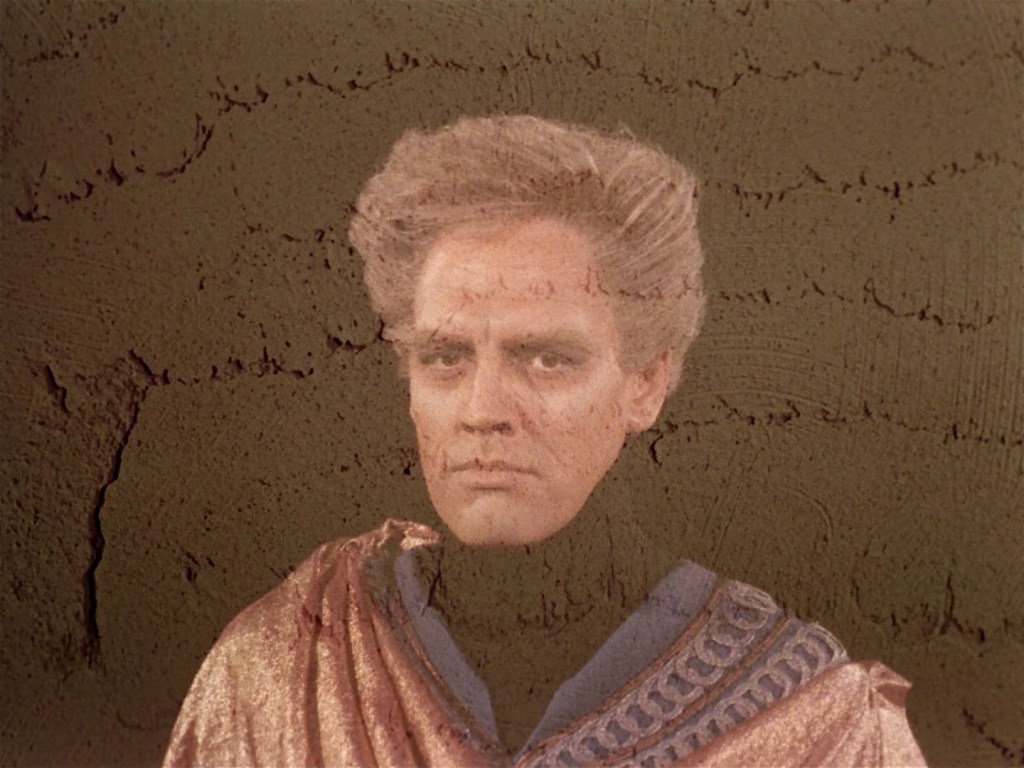
The AI “Landru” from episode “Return of the Archons”.

The problem and ethical issues haven’t changed in over 60 years yet companies keep foisting AI on us. ChatGPT and other AI services scan this blog almost daily, probably misappropriating my content, and Google insists on providing flawed AI answers to search queries even when I don’t want them.

Yet another flawed reply from Google AI. Someone posted this online, I did not encounter this first-hand. But I have run into flagrantly wrong answers.

My phone’s auto-correct uses AI too, even after I’ve turned off Siri. Even my Fire Emblem Amiibo have AI builtin:

A few of my Fire Emblem amiibo. In front is Byleth from Fire Emblem: Three Houses, to the right is Robin from Fire Emblem: Awakening, and on the left is Chrom (the best dad) from the same game.

It’s almost impossible to avoid these days.

Still, I have tried my best to avoid using it whenever possible, though. I turn it off when I can, I never use ChatGPT, and limit use of Google or disable AI answers using “-ai” in the query. As with helping the environment, and other things, small efforts still help.

In fact, AI is known to harm the environment through its waste of resources, and datacenter output.

SPOCK: Fascinating. This atmosphere is remarkably similar to your twentieth century. Moderately industrialized pollution containing substantial amounts of carbon monoxide and partially consumed hydrocarbons.
MCCOY: The word was smog.
SPOCK: Yes, I believe that was the term.

Star Trek, “Bread and Circuses” (s2ep25), Stardate 4040.7

This blog, and its nerdy author, remain committed to free, open, and 100% human content.

Further, contrary to what proponents assert, AI is not inevitable. The spread of AI can be countered.

Simply put: help the environment, help promote human creativity, and don’t feed the machine.

Fixing Email Subscription Settings in WordPress

A while back, I mentioned that I was trying to fix some problems with email notifications when I send updated blog posts, and after considerable trial and error, I started to realize that part of the issue wasn’t how I wrote the blog posts (though I can always improve), but how I was receiving them in email.

I subscribe to my own WordPress.com blogs over email so I can test things, but I also subscribe to other WordPress.com blogs as well for personal enjoyment. No matter what blog I subscribed to, the text would come in as plain text, which is hard to read since blogs tend to use a lot of rich formatting, links, images and so on. It’s readable, but not a great experience.

Finally, after contact WordPress.com support, I finally found the setting that adjusts this:

if you go to your WordPress.com account settings, you can then adjust Notification Settings, and from there you can choose “Email delivery format”. Once I did that, I finally got HTML emails from blog posts. I can’t tell you how nice it is to finally have readable email updates.

I hope this helps someone!

Typing Brahmi Script in HTML

A while back, I wrote a small post on how to express Sanskrit and Pali using diacritics in HTML and the Roman alphabet. This is handy for expressing Buddhist terms accurately, since the standard 26 letters of the English alphabet don’t always tell the whole story.

Coin of Agathokles, king of Bactria (ca. 200–145 BC). British Museum. Personal photograph 2006, courtesy of Wikipedia. The coin shows inscriptions in Greek. Upper left: ΒΑΣΙΛΕΩΣ. Upper down: ΑΓΑΘΟΚΛΕΟΥΣ. The coin also shows a Buddhist lion and Lakshmi. Note the Brahmi script on the obverse, too.

While exploring Sanskrit writing systems recently, I dabbled in using HTML to express the ancient Brahmi script, which was used to write Sanskrit a long time ago, including some Buddhist scriptures, and the writings of Emperor Asoka.

Brahmi script is available through Unicode, like many other obscure symbols. The key is to know how to type a Unicode letter in browser:

 & # x(number) ;

The numerical table for each Brahmi script letter is found here and on Wikipedia. The code for “ka” (क in modern Devanagari script) is 11013, so in HTML, it would be & # x 11013 ; without any spaces. This produces 𑀓. So far so good.

But Brahmi, like other similar scripts, is an abugida. The vowels don’t usually stand alone as separate letters. Instead, they modify the base consonant. This is true with modern Devanagari as it is with Brahmi. So, in the example above, “ki” would be “ka” but modified with an “i” extension: कि in Devanagari, or 𑀓𑀺 in Brahmi. For Brahmi, I put & # x 11013 ; without any spaces, then & # x 1103a ; the code for the “i” vowel extension.

One other thing we need to cover is the consonants without a vowel. For example, in the word Buddha (buddho in Pāli language) , it would be split up into three letters “bu” “d” and “dha” with an “o” extension. The “d” here normally needs vowel, by default “a”, but if you add a virama mark, then instead of “da”, it gets cut off as “d”. In the Brahmi script, this is a & # x 11046 ; which looks like 𑀓𑁆 (k), a small line above the letter. Using the example of Buddha above, this would be 𑀩𑀼𑀤𑁆𑀥𑁄 or letters “bu” “d with virama” and “dho”.

As a bonus, the nembutsu in Sanskrit, in its simplest form, is namo’mitābhāya1 which in Brahmi script might be:

𑀦𑀫𑁄𑀫𑀺𑀝𑀸𑀪𑀸𑀬

Typing each letter by its Unicode HTML number is not a quick and easy process, but if you do it enough, it becomes somewhat easier. Soon, you’ll be typing like Emperor Ashoka in no time. 𑁍2

P.S. If you prefer to type in Devanagari, by the way, the simplest approach is to simply use the Hindi keyboard setting if you have one. You won’t need to type each Unicode letter. 😉

1 This may be a Chinese phrase rendered back into Sanskrit, not the other way around, but it does appear in the extant version of the Larger Sutra of Immeasurable Life, and something called the Dhāraṇīsaṅgraha, a collection of Buddhist dhanaris.

2 The lotus symbol, by the way is & # x 1104d ;.

Buddhism, HTML and diacritics

If you want to impress your friends (or your blog readers…*ahem*) when you talk about Buddhism, why not use some HTML diacritics?

You see, most of the Buddhist terms you read about derive from one or more non-European langauges:

  • Sanskrit: the holy language used in Hinduism, religious literature. Now a dead language.
  • Pali: an ancient language in India, mostly used for trade. It was popular as a lingua franca. Also a dead language.
  • Classical Chinese: this is how Chinese was in the olden days. There are more Buddhist texts preserved in Classical Chinese than any other language.
  • Japanese: actually, most Japanese Buddhist terms are really just Classical Chinese with Japanese pronunciations, as was the style back then.

None of these languages natively use a Romanized script like Western European languages do, so it’s up to translators to figure out how to Romanize things. So, to capture all the sounds that don’t exist in English, linguistics experts recycle Roman letters, but add extra characters: diacritics.1

Until real recently, it was pretty difficult to print non-standard Roman characters on a webpage. Back then, users had to download special fonts, and your browser had to be able to read them.
Now though, as the Internet becomes more international, you can pretty much print any Romanized character you want using special “extended-ASCII” codes in HTML.

For example, let’s say I want to print an ā character. In the old days, I could use a Character Palette program on Windows or Mac to copy/paste it (if I could find it), but now I can just use the HTML extended-ASCII code & # 257 ;. This is, all one word, an ampersand, a pound sign, the HTML code number and a semi-colon. If you put these together the web browser will automatically translate it into the right letter you want.

All extended-ASCII letters in HTML have the format of:

&#(number);

So, the trick is just remembering what number you want, and fill in the blanks. Remember that you have to do this for each special letter you want to print.

Here’s a helpful chart for some commonly used diacritics and letters for Buddhist terms. Most are for Pali/Sanskrit, but for Japanese, the long vowel sounds are used too (ā, ī, ō, ū):

  • á – 225, the a with an acute mark
  • é – 233, the e with an acute mark
  • ñ – 241, the n with a tilde over it
  • ú – 250, the u with an acute mark
  • ā – 257, the long “ah” sound
  • ī – 299, the long “ee” sound
  • ō – 333, the long “oh” sound
  • ś – 347 (346 for upper case), the s with an acute mark. In practice, this is functionally the same as ṣ but written different in Sanskrit.
  • ū – 363, the long “oo” sound
  • ḍ – 7693, a “d” sound in Sanskrit
  • ḥ – 7717, a breathy “h” at the end, a.k.a. the visarga.
  • ḷ – 7735, the nasal “l” sound
  • ṁ – 7745, a soft “m” sound
  • ṃ – 7747, the “ng” sound
  • ṅ – 7749, another “ng” sound
  • ṇ – 7751, the soft “n” sound
  • ḍ – 7693, the nasal “d” sound
  • ṛ – 7771, the deep “r” sound in the back of the throat.
  • ṣ – 7779 (7778 for upper case), the emphatic “s” sound
  • ṭ – 7789, the nasal “t” sound

Try it out on your webpages and see if it works well for you. After a few times, it gets much easier to accurate represent Buddhist terms in English. Good luck and happy blogging!

Edit: an alternate system of romanizing Sanskrit called the Harvard-Kyoto system exists too. Use what seems appropriate for you.